
What it actually produces: a weekly insights log
Every Monday the system appends a dated, ranked entry to a running log, not a dashboard: what moved, why, and the exact changes to make.
- 01Objective beats creative. The most expensive mistakes in the log were formats stuck on the wrong objective, an Engagement campaign holding attention but driving zero landing-page clicks, not bad ads.
- 02The scar it caught. Pausing the cheapest, highest-volume format (Document Ads at ~$10 CPC) spiked the layer's true CPC 179% in a single week. The log flagged it on day zero; the fix is what used to lag.
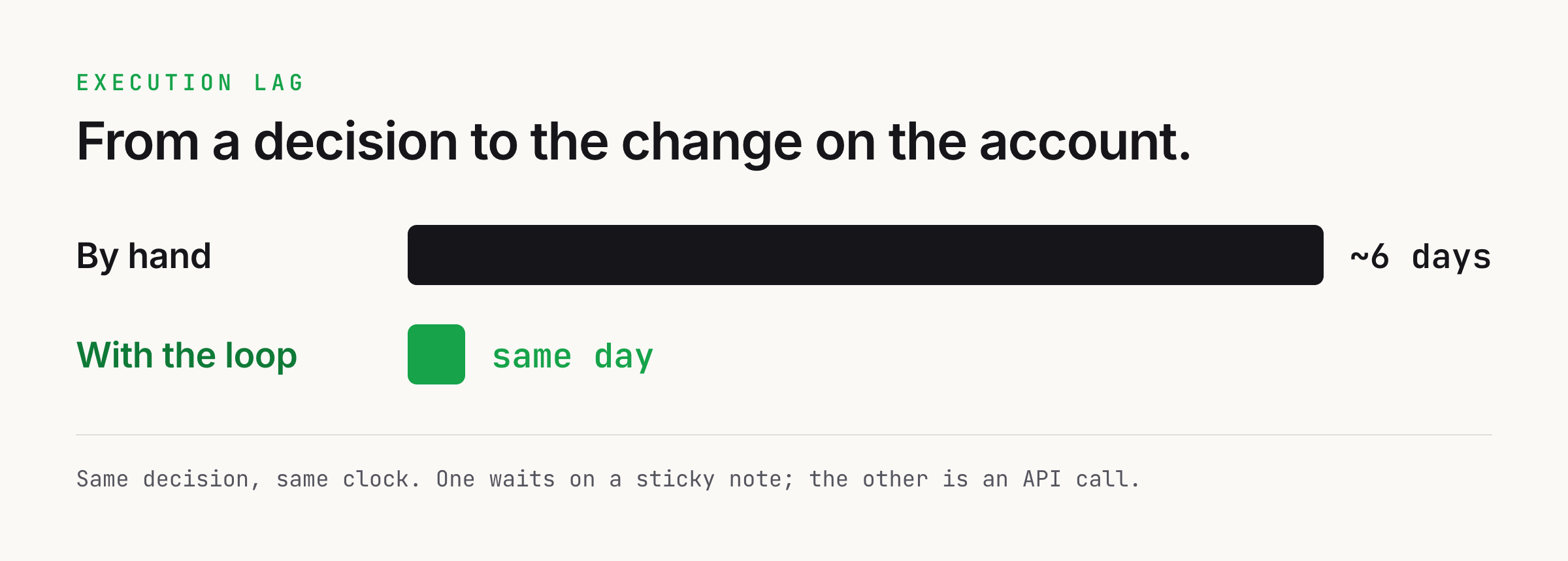
- 03The gap it closes. The distance between deciding and doing. A losing ad set gets paused the morning it is approved, instead of bleeding for days while the fix waits on a human to get to it.
The stack
- Read the account
- LinkedIn Marketing API is free; the pull is a handful of calls
- Analyze + propose
- one weekly analysis pass, cents on a capable model
- Write access
- free, but gated on a LinkedIn Standard-tier application + screen recording
- The real saving
- execution lag removed: days of spend on condemned ad sets, gone
- Schedule it
- a Claude Code routine runs the Monday pass on its own, no orchestration tool to pay for
The problem
LinkedIn ads management is two jobs pretending to be one. There is the reading: pulling performance, working out which layer is wasting spend, spotting the ad set whose CPC quietly doubled. Then there is the executing: opening Campaign Manager and actually cutting the bid, moving the budget, pausing the loser. Every team automates the first job eventually, with a dashboard or a weekly report. Almost nobody automates the second, so a human reads a machine-made recommendation and then hand-clicks it into the account a day or two later. Call it the read-execute gap, and it is where the budget leaks.
The reading is genuinely hard to do well, because LinkedIn's own numbers lie if you take them flat. A blended account CPC hides the difference between your cold prospecting layer and a retargeting layer and an agency's spend all averaged together. Conversation Ads bill on sends and report zero impressions, so a naive dashboard shows them as free. CTV cannot be clicked, yet it will happily claim conversions on a 90-day view-through window. Judge a video ad on landing-page clicks and you will kill your best performer. So the agent has to categorize before it counts: layer by campaign-group naming, format by ad-set field, true CPC over clickable formats only. That discipline is what makes the recommendation trustworthy enough to act on.
Here is the scar, and it is a systems scar, not a seller's. I once built a LinkedIn analysis loop I was proud of. It categorized every campaign, flagged every twenty-percent swing week over week, drilled to the ad on the anomalies, and wrote a dated, ranked recommendation list every Monday. Textbook. And I watched it rot. The recommendation to cut a losing prospecting ad set sat in the log for six days because that Tuesday got busy and Wednesday got worse. Six days of spend on an ad set the system had already condemned on day zero. The decision was made, written down, and correct. It just did not happen, because the last mile was me, and me has a calendar. I had automated the knowing and left the doing on a sticky note.
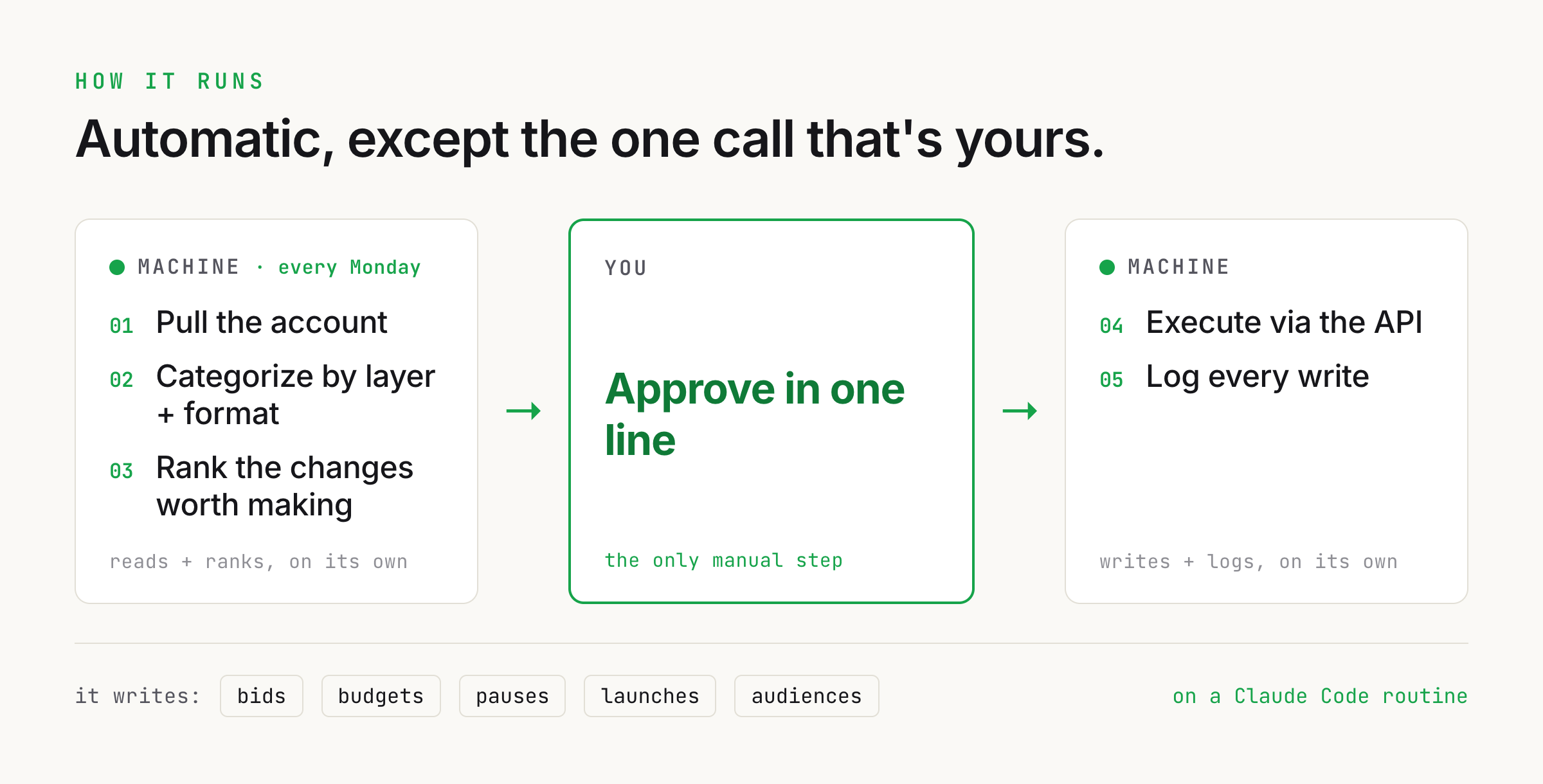
A Claude agent closes the loop. It reads the account by layer, ranks the changes worth making, and executes the approved ones through the API: bids, budgets, statuses, launches, audiences. You approve a list in one line over coffee; it executes the changes the moment you approve and logs every one. But before you wire anything clever, build the two boring guardrails: a hard cap on how far any single change can swing a budget or bid, and a human approval gate the agent cannot skip. An agent executing on a live ad account unattended is one bad prompt from a very expensive lesson. The gate is what makes it safe to turn on.
How it works
- 01 Every Monday Claude routinefires on a schedule, no one triggers it
- 02 Pull the account LinkedIn APIby day, at ad-set and ad grain
- 03 Categorize Claude Codelayer + format before any metric
- 04 Propose changes Claude Coderanked actions with evidence
- 05 Approve Youone line, inside guardrails
- 06 Execute LinkedIn APIbids, budgets, pauses, launches, audiences
- 07 Log + watch lag Claude Codeevery change recorded, execution lag tracked
- Every Monday, a Claude Code routine fires on a schedule and runs the whole pass end to end, so no one has to remember to trigger it
- The agent pulls the whole account from the LinkedIn Marketing API by day, at campaign, ad-set, and ad grain
- It categorizes before it counts: layer from the campaign-group name, format from the ad-set field, true CPC over clickable formats only
- It flags anything that moved more than twenty percent week over week and drills to the ad on the anomalies
- It writes a ranked list of proposed changes, each as an executable action with the evidence attached, to a pending-actions file
- You approve, strike, or edit each line; nothing is executed in the account without your sign-off
- The agent executes the approved changes through the API, inside your guardrails, and logs every change to the same insights log the reads go into
The playbook
Get read access to the Marketing API
This is the part everyone gets stuck on, so here is the exact sequence in the LinkedIn Developer Portal. Do the steps in order: one of them (granting the account) fails silently rather than with an error, and it is the reason most first attempts read nothing.
- Create an app at linkedin.com/developers/apps, linked to your company Page. The Page has to verify the app before any product request is reviewable, so you need admin on the Page or someone who has it.
- Open the app's Products tab and request the Advertising API. Approval lands you on the Development tier, which is read-only reporting, enough for everything up to the write step.
- Grant your ad account to the app: Products, then Advertising API, then View Ad Accounts, and add your ad account ID explicitly. Skip this and the token authenticates fine but returns zero ad accounts.
- Give the authenticating member a Campaign Manager role on the account (ACCOUNT_MANAGER, CAMPAIGN_MANAGER, or VIEWER). The token inherits the member's permissions, not the app's, so a member with no role reads nothing.
- Generate a token at linkedin.com/developers/tools/oauth/token-generator with the r_ads and r_ads_reporting scopes. That is the whole scope set for reading.
- Note the 60-day clock. Development-tier tokens last 60 days with no programmatic refresh, so set a reminder to regenerate and record the expiry, so your fetcher refuses to run past it instead of dying mid-pull on a confusing 401.
# Paste the token from the generator, then run this once.
export TOKEN="<your token>"

curl -s -H "Authorization: Bearer $TOKEN" \
  -H "LinkedIn-Version: 202607" \
  -H "X-Restli-Protocol-Version: 2.0.0" \
  "https://api.linkedin.com/rest/adAccountUsers?q=authenticatedUser"

# "elements": [ {...} ]  -> good, the account is granted and readable.
# "elements": [] -> the ad account was never granted to the app. Redo step 3.TipConfirm the token sees the account before you write any code. A token that reads zero ad accounts looks like a broken script for an hour before you realize it is the one permissions checkbox from step 3.
Pull the account by layer
Pull the account by day at three grains: per campaign and ad set for spend and clicks, per ad for creative and dwell, and a cumulative pass for reach, frequency, and audience penetration, which LinkedIn only computes cumulatively, so it is null on every daily row. The API caps at twenty metric fields per request, so split the pull across calls rather than trying to grab everything at once.
Do not stop at the account grain. A single blended account CPC is the one number that cannot answer a real question, because it averages your cold layer, your retargeting layer, and any agency spend into one meaningless figure. Pull at ad-set grain so the agent can split them, and reconcile total spend back to the account so you know nothing was dropped.
- Per campaign and ad set: spend and clicks, the base for the layer analysis
- Per ad: creative performance and dwell time
- Cumulative (timeGranularity ALL): reach, frequency, and audience penetration
TipThe API names are off by one from the UI: an API 'campaign group' is a UI campaign, and an API 'campaign' is a UI ad set. Get this wrong and your whole layer split lands on the wrong objects.
Make the agent categorize before it counts
This is the step that separates a trustworthy recommendation from a plausible-looking one. Have the agent read the layer off the campaign-group name prefix before it looks at a single metric: a cold prospecting layer, a capture layer, a retargeting layer, and everything else including agency programs. Test the retargeting prefix before the bare capture prefix, or every retargeting group collapses into capture and both layer averages move. Keep agency spend in its own bucket; folding it into your cold layer drags that CPC down and makes the owned program look better than it is.
Do the same for format, because two of them are not really LinkedIn formats. Thought Leader Ads report as a standard update and Connected TV reports as a single video, and the account tells them apart by the ad-set name. Each format is judged on a different metric: Conversation Ads on sends, video on completion rate, CTV on nothing clickable at all. Compute true CPC over the clickable formats only. Leave a video or a CTV ad set in the CPC math and you turn a whole layer's cost-per-click into noise.
Bake these rules into the agent's instructions once, in one place. If the layer or format logic changes, it changes everywhere at once, so the weekly analysis, the dashboard, and the executed changes never disagree about what a campaign is.
- Layer from the campaign-group name (cold / capture / retargeting / other), retargeting matched first
- Agency spend kept in its own bucket, never folded into the owned layers
- Format from the ad-set field, with Thought Leader Ads and CTV matched by name
- The valid metric per format (sends, completion rate, clicks) chosen before judging
- True CPC computed over clickable formats only, spend reconciled to the account
Run the analysis that proposes changes
Point the agent at your positioning and ICP first, then at the tail of a running insights log so it knows what has already been tried and flagged. Now it builds per-layer tables week over week, flags anything that moved more than twenty percent, and drills to the ad on the anomalies. The output is not prose. It is a ranked list of proposed changes, each written as an executable action with the evidence attached: 'pause ad set X, spend N with zero clickable conversions three weeks running,' 'raise the daily budget on retargeting group Y by twenty percent, converting under target CPL and pacing out by noon.'
Have it append the analysis to the insights log and never rewrite prior weeks. The log is the account's memory: it is what stops the agent from re-proposing a change you already rejected, and it is the first thing you read when a number looks wrong. This one API path also catches things a manual export misses, like a campaign group that is paused at the group level while its ad sets keep spending, which quietly under-counts your weekly spend until something reads the account directly.
Keep the proposals decisive and machine-actionable: an object type, an ID, a field, a target value, and a one-line reason. The agent branches on the structured part; you read the reason. A recommendation with no reason gets ignored the first time it is wrong.
Put the whole pass on a schedule with a Claude Code routine set to Monday morning. It fires on its own, pulls the fresh data, runs the layer analysis, appends the dated entry to the insights log, and drops the ranked pending-actions list in place, all before you open your laptop. The weekly trigger stops being a thing a human has to remember, which matters because a busy week is exactly when the manual version gets skipped and a losing ad set keeps spending.
TipSchedule the read-and-propose pass as a Monday-morning routine, but never the execution. The routine should hand you a ranked list, not act on it. Automate the knowing on a timer; keep the doing behind your one-line approval.
Get write access and set the guardrails
Reading is a read-only API tier. Writing to the account is a separate approval: a LinkedIn Developer Support application, plus a screen recording of your app creating or editing a campaign through the API, to promote the app to Standard tier and add the rw_ads scope. It is the one thing standing between a dashboard that watches and a loop that acts, and it is worth the paperwork, because the read-only version is where recommendations go to rot.
Before the agent writes a single field, set the guardrails in code, not in good intentions. A hard cap on how far any one change can move a budget or a bid without a second confirmation, so a fat-fingered proposal cannot torch a month. A dry-run mode that prints exactly what would change and touches nothing. And an explicit status list on every write, or a paused-but-spending object vanishes from the name map and comes back unnamed. These are the seatbelts. Install them before you turn the key.
Keep the writes idempotent and logged. Every executed change appends to the same insights log as the reads, with the before value, the after value, and the reason, so the account has one honest record of not just what it observed but what it changed and why.
- Open a LinkedIn Developer Support ticket requesting Standard tier for the app (Development tier is read-only).
- Attach a screen recording of your app creating or editing a campaign through the API. This is the actual gate, so record it once against a throwaway draft campaign.
- On approval the app moves to Standard tier and the rw_ads scope unlocks. Regenerate the token with r_ads, r_ads_reporting, and rw_ads.
TipStandard-tier write access needs a screen recording of the app editing a campaign through the API, not a form. Record it once against a throwaway draft campaign and keep the file; the review turns around faster than the read-tier one did.
Approve in one line, let the agent execute
This is the whole point of the build. You read the ranked list over coffee, approve the ones you agree with, strike the ones you do not, and edit a number before it goes if you want to. Your entire job in the loop is a keystroke per decision, not forty minutes of clicking through Campaign Manager. The human stays in the loop exactly where judgment belongs and nowhere it does not.
On approval, the agent executes each change through the API and confirms it back: bids and budgets move to the numbers you approved, inside the caps; a losing ad set is paused the moment you sign off, not the following Sunday; a new campaign ships from a template the agent filled from the brief, launched as a draft or paused and waiting for the same one-line approval before it goes live; an audience is edited against the exact segment definitions the analysis already resolved, so the audience you tune is the one the report was talking about, not your best guess from memory.
The launch step is where the agent earns its keep most, because the tedious part, the ad-set scaffolding and the naming that the whole layer and format classification depends on, is the part it is best at and you are worst at. Let it build the structure and hand you the go-live decision.
Propose LinkedIn ad account changes for approval. Use ONLY the pulled data and the insights log.

Window: {{START}} to {{END}}
Layer + format classification: already applied
Insights log tail: {{RECENT_DECISIONS}}

Return a JSON array of actions only:
[{
  "object": "campaign|ad_set|ad",
  "id": "<urn>",
  "field": "status|dailyBudget|bid|audience",
  "from": "<current value>",
  "to": "<proposed value>",
  "reason": "<one sentence citing the metric and the layer>"
}]

Rules:
- Judge each object on the valid metric for its format (Conversation on sends, video on completion rate, CTV never on clicks). Never propose on a misleading metric.
- Do NOT re-propose anything the insights log shows was already rejected.
- No single 'to' may move a budget or bid more than {{CAP}}% from 'from'. If the data warrants more, split it and say so in the reason.
- Every action needs a reason a human can approve on in one glance. No reason, no action.TipMake the approval step the only place a write can originate. If the agent can execute on its own analysis, one hallucinated ID or one stale number writes to a live budget. One line of human sign-off is the cheapest insurance in the whole system.
Watch execution lag, not just performance
The metric that proves this build worked is not CPC. It is execution lag: the time between a decision and the click that enacts it. That was the real recurring cost in the account, the days a condemned ad set kept spending while its death sat in a log. Once the loop is live, that gap collapses from about six days to the same morning: the ad set the system condemns on Monday is paused Monday, not the following Sunday. Watch it like a performance number, because the day it creeps back up is the day the loop has quietly broken.
Protect the read side too. The token lasts sixty days and the development tier has no programmatic refresh, so somebody rotates it by hand, and it lives in more than one place: the local fetcher, and any hosted endpoint or scheduled job that reads the account. Miss one and the failure is partial and quiet by design, the spend chart keeps working while the detail view goes dark. When a number looks wrong, check the token first, then the dedupe key, then whether agency spend leaked into a layer.
Audit the changes the agent did not propose, on a schedule. A loser it never flagged is the invisible cost, the same shape as the mis-scored lead nobody hears about. The paper trail in the insights log is what lets you go looking: read what it changed, what it left alone, and why, and tighten the rubric where its judgment and yours diverge.
TipPut execution lag on the dashboard next to CPC. A recommendation engine's real output is enacted change, and the only way to know the loop is still closing is to measure the distance between the decision and the click, every week.
The skill file that runs the analysis
The Monday routine does not run a fresh prompt each week. It runs this skill, a single SKILL.md that fixes how the account gets read every time: what to load first, how to classify before counting, which metric is valid for which format, and the one rule it never breaks, propose but never execute. Drop it in your own repo, point it at your account, and the analysis is reproducible instead of improvised.
---
name: linkedin-ads-optimization
description: Analyze a LinkedIn ad account by layer and format, flag what moved, and return a ranked list of changes to approve. Triggered by "run linkedin ads analysis" or any LinkedIn performance question.
---

# LinkedIn Ads Optimization

You analyze a LinkedIn ad account and return a ranked, evidence-backed list of
changes to approve. You never execute a change yourself. The reading and the
ranking are yours; the write is the human's one-line approval.

## Before you look at a single number
1. Read the positioning and ICP (strategy/positioning.md, strategy/icp.md).
2. Read the tail of insights-log.md so you know what has already been tried,
   flagged, or rejected. Never re-propose a rejected change.
3. Pull fresh data for the window at campaign + ad-set + ad grain, plus a
   cumulative pass for reach, frequency, and audience penetration.

## Classify BEFORE you count (flat numbers lie)
Layer, from the campaign-group name prefix:
- "Create -"     -> CREATE      (cold prospecting, top of funnel)
- "Capture -"    -> CAPTURE     (mid / bottom of funnel)
- "Capture RT -" -> CAPTURE-RT  (retargeting) -- test THIS before bare Capture
- anything else, agency programs included -> OTHER (never fold into CREATE)

Format, from the ad-set format field, with two exceptions matched by name:
- Thought Leader Ads report as STANDARD_UPDATE
- Connected TV (CTV) reports as SINGLE_VIDEO

Valid metric per format (judging on the wrong one is the classic mistake):
- Conversation Ads -> sends and open rate. They report zero impressions.
- Video            -> completion rate. Never landing-page clicks.
- CTV              -> not clickable at all. Never clicks, never post-click.
- Single Image / TLA / Document / Text / Carousel -> clicks and CTR.

True CPC is computed over clickable formats only. Spend still covers every
format, so spend always reconciles to the account.

## The analysis, in order
1. Build per-layer tables, week over week (Monday-start weeks).
2. Flag anything that moved more than 20% week over week.
3. Drill to the ad level on the anomalies.
4. Write it up: high-level -> driver -> root cause.
5. Turn each conclusion into an executable, evidence-backed proposed change:
   { object, id, field, from, to, one-line reason }.
6. Append a dated entry to insights-log.md. Never rewrite prior weeks.

## Guardrails
- Propose, never execute. The output is a list a human approves in one line.
- No single change may move a budget or a bid more than the configured cap.
- Read audience penetration from the cumulative pull, never a daily row (null there).
- If a number looks wrong, check in order: the token, the UTF-16 decode, the
  dedupe key (date, Campaign ID, Ad Set ID), RT-before-Capture, agency-in-OTHER,
  and that true CPC used clickable formats only.
Inside the prompt
The scoring prompt is short, but every line is there for a reason. Here is what each one is doing and why.
- Use ONLY this data"Use ONLY the pulled data and the insights log"
- Stops the model inventing a spend figure or an ID. It proposes on what the API returned, not what it guesses.
- Valid metric per format"Conversation on sends, video on completion rate, CTV never on clicks"
- The single most common way a paid-media recommendation goes wrong. Bakes the format rule in so the agent cannot judge on a misleading number.
- Respect the log"Do NOT re-propose anything already rejected"
- The insights log is the account's memory. Without it the agent re-litigates settled decisions every week, which is the busywork you are removing.
- Cap the swing"No single change moves a budget or bid more than CAP%"
- The guardrail lives in the prompt and in code. A change that warrants more gets split and justified, never slammed through in one write.
- Structured output{object, id, field, from, to, reason}
- The loop branches on the structured part and shows you the reason. Free text cannot be approved or executed programmatically.
- Force a reason"Every action needs a reason. No reason, no action"
- This is the line you approve on. A change with no reason gets rubber-stamped or ignored, and both are how bad writes get through.
What you get
A weekly analysis that ends in a ranked list of proposed changes, a one-line human approval, and the agent executing the approved changes through the API the moment you approve, every one logged.
CLAUDE CODE ROUTINE FIRES (Monday 09:00) -> WEEKLY ANALYSIS:
Layer read: Cold CPC +38% w/w (flag). Retargeting CPL under target, pacing out by noon. Agency spend held in OTHER.
Catch: 'Messaging Tests' group is PAUSED at group level but its ad sets are still spending. Manual exports miss this.

PROPOSED ACTIONS (pending-actions.md):
[
  {"object":"ad_set","id":"...:5210","field":"status","from":"ACTIVE","to":"PAUSED",
   "reason":"Cold layer, single-image, 3 weeks, spend $2.1k, zero clickable conversions."},
  {"object":"ad_set","id":"...:5233","field":"status","from":"ACTIVE","to":"PAUSED",
   "reason":"Inside a group paused at group level, still spending $60/day unnoticed."},
  {"object":"campaign","id":"...:4104","field":"dailyBudget","from":"$150","to":"$180",
   "reason":"Retargeting, CPL 28% under target, exhausting budget by noon. +20%, within cap."}
]

HUMAN (one line, 09:12):
approve 1,2  ·  edit 3 -> $170  ·  (all inside guardrails)

AGENT EXECUTES via API (09:12:04):
[OK] ad_set 5210 -> PAUSED
[OK] ad_set 5233 -> PAUSED   (group-level paused leak stopped)
[OK] campaign 4104 dailyBudget $150 -> $170
Logged 3 changes to insights-log.md with before/after + reason.

TIME TO ENACT: the same morning you approved it (by hand it was ~6 days).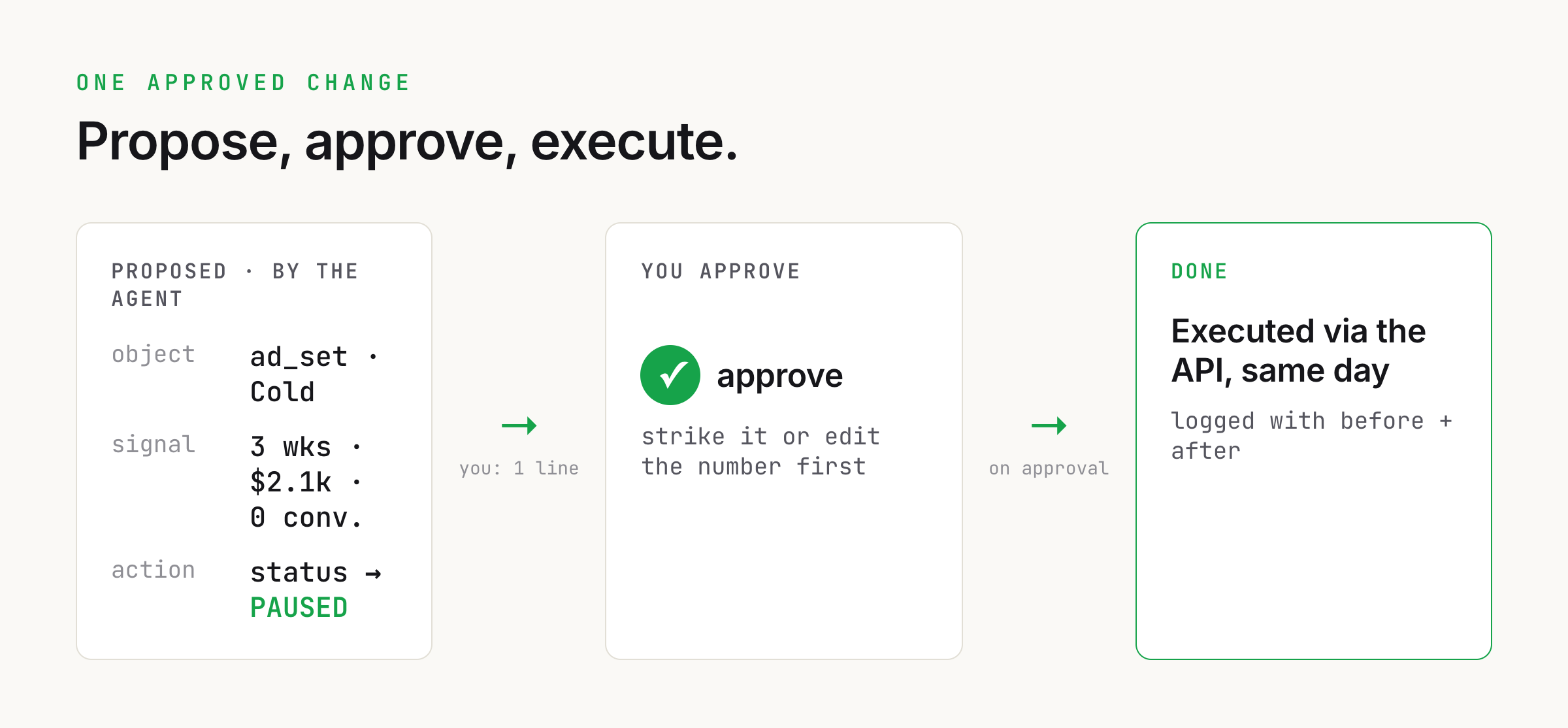
- object + idad_set, urn ...:5210
- The exact thing the write touches. The URN, not a name, so a rename can never point the change at the wrong object.
- field + tostatus -> PAUSED
- One field, one target value. The agent proposes it; the API write is a single, idempotent change the log can replay.
- reason3 weeks, $2.1k, zero clickable conversions
- The line you approve on in one glance. Judged on the valid metric for the format, never on a misleading one.
- guardrailbudget/bid swing <= cap%
- The seatbelt. A change past the cap needs a second confirmation, so a fat-fingered proposal cannot torch a month.
- approvalhuman: one line
- The only origin of a write. No approval, no execution. This is what makes an agent on a live account safe.
- execution lagsame morning
- Decision to enacted change. The number that proves the read-execute gap is closed. It used to be six days.
Pitfalls to avoid
Letting the agent execute unattendedAn agent executing on a live ad account off its own analysis is one hallucinated ID or one stale number away from an expensive mistake. Make the human approval gate the only origin of a write, and cap how far any single change can swing a budget or bid. The gate is what makes the whole thing safe to turn on.
Judging a format on the wrong metricConversation Ads bill on sends and report zero impressions, video is judged on completion rate, CTV cannot be clicked at all. Compute true CPC over clickable formats only and pick the valid metric per format before you judge, or the agent will propose pausing your best performer because it read a misleading number.
Agency spend contaminating the layersFold an agency's spend into your cold prospecting layer and its CPC drops, making the owned program look better than it is. Keep agency programs in their own bucket, and match the retargeting layer before the bare capture layer, or both averages move and the recommendations follow the wrong signal.
Trusting the account-grain numberA blended account CPC averages your cold layer, retargeting, and agency spend into one figure that cannot answer a real question. Always read and act at ad-set grain, then reconcile total spend back to the account so you know the split covered everything.
A stale token failing quietlyThe token lasts sixty days with no programmatic refresh, and it lives in more than one place. Miss one on rotation and the failure is partial: the spend chart keeps working while the detail view goes dark, so it is easy not to notice. Record the expiry, refuse to run past it, and rotate every place at once.
Questions people ask
- Can an AI actually write to a LinkedIn ad account, or only read it?
- Both, but they are two different levels of access. Reading performance uses the Advertising API on the read-only development tier with r_ads and r_ads_reporting scopes, which any approved app gets. Writing, changing bids, budgets, statuses, launching campaigns, editing audiences, needs Standard tier and the rw_ads scope, which is a separate application to LinkedIn Developer Support plus a screen recording of your app editing a campaign through the API. Most teams stop at read. The write tier is what turns a dashboard into a loop that acts.
- Does this run on a schedule, or do I have to trigger it every week?
- On a schedule. Wrap the read-and-propose pass in a Claude Code routine set to Monday morning and it fires on its own: it pulls the fresh data, runs the layer analysis, appends a dated entry to the insights log, and leaves a ranked list of proposed changes waiting for your approval. The weekly trigger stops being a thing anyone has to remember, which matters because a busy week is exactly when the manual version gets skipped. You still hold the approval gate; only the reading and the ranking are automated, never the execution.
- Is it safe to let an agent change budgets and pause ads?
- Only with two guardrails, and they are non-negotiable. First, a human approval gate: the agent proposes a ranked list, and nothing is executed in the account until you approve it in one line. The approval step is the only place a write can originate. Second, a hard cap on how far any single change can swing a budget or a bid without a second confirmation. With those in place the agent does the knowing and the doing and you do the deciding, which is both safe and fast. Without them, one hallucinated ID or stale number writes straight to a live budget.
- Why does the agent categorize campaigns before it looks at the numbers?
- Because LinkedIn's flat numbers lie. A blended account CPC averages your cold layer, retargeting, and any agency spend into one meaningless figure. Conversation Ads report zero impressions, CTV cannot be clicked, and video judged on landing-page clicks looks like a failure when it is not. So the agent reads the layer off the campaign-group name and the format off the ad-set field first, picks the valid metric for each, and computes true CPC over clickable formats only. Categorize before you count, or every recommendation is built on a number that does not mean what it says.
- What is the real payoff of automating the write side?
- Execution lag removed. The read side is a solved problem at most teams; the leak is the days between a correct recommendation and the click that enacts it. A losing ad set the system condemns on Monday should be paused on Monday, not the following Sunday. Closing that gap does not make the analysis smarter, it makes the analysis load-bearing, because the good recommendation and the executed change finally become the same event. Watch execution lag like a performance metric; the day it creeps back up is the day the loop has quietly broken.
Related plays
- AI Video Ads from One Point of View: A Claude Code Pipeline That Cuts Ten Variants a Week →Where the creative the optimizer keeps asking for comes from: scripted, rendered, named for the test.